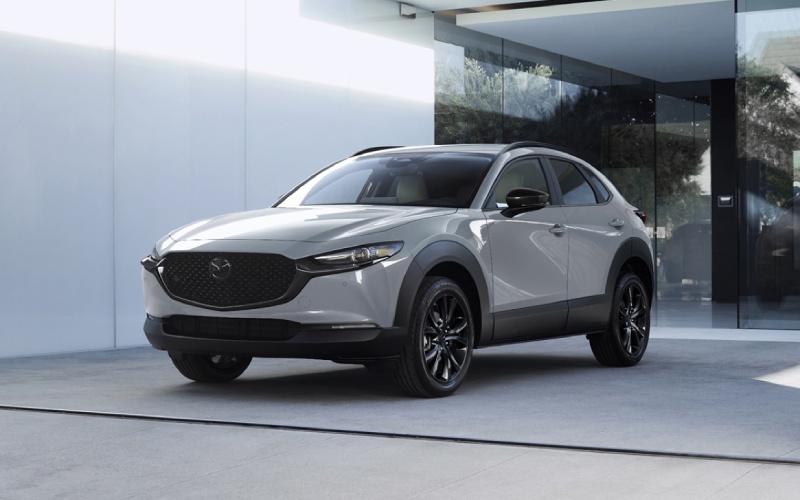
CardinaleWay Mazda Peoria - Can I start my 2026 Mazda CX-30 from my phone near Deer Valley, AZ?
The short and useful answer is yes — the 2026 Mazda CX-30 supports Remote Engine Start through Mazda Connected Services, accessible in the MyMazda App. For everyday life around Deer Valley, AZ, that simple tap on your phone can make a real difference when you are parked by the office off Loop 101, heading out from Deer Valley Towne Center, or prepping for a kid drop-off before hopping onto I-17. At CardinaleWay Mazda Peoria, we help new owners set up the app on delivery day so Remote Start and other connected features work exactly the way you expect from day one.
What Remote Engine Start does on the 2026 Mazda CX-30
Remote Engine Start lets you start or stop the engine from your smartphone using the MyMazda App. Once started, the CX-30 can begin stabilizing cabin temperature based on its last climate control settings, so you are stepping into a more comfortable interior when you get in and drive. The vehicle stays locked while running, and the engine automatically shuts off after a timed interval for safety and efficiency. Mazda Connected Services for the 2026 Mazda CX-30 is complimentary for one year, giving you time to experience how the feature fits your routine near Deer Valley, AZ.
Just as helpful, the app provides status information so you can quickly confirm if the doors are locked or whether the engine is still running. If you commute across the Agua Fria Freeway or park at Deer Valley Airport, Remote Start and status checks bring a layer of confidence you will appreciate every day.
Why this matters for drivers near Deer Valley, AZ
Daily driving in the North Valley is a mix of quick errands at The Shops at Norterra, office park parking along 7th Street and Pinnacle Peak, and weekend meetups that start before sunrise. Remote Engine Start is a small convenience with an outsized benefit: it helps you get on the road feeling put together and focused. Use it before loading gear for a morning hike or while you close your laptop at the end of the workday — the CX-30 is ready when you are.
Beyond comfort, it is a tech experience that feels modern and seamless. The 2026 Mazda CX-30 complements Remote Start with available Alexa Built-in for in-vehicle voice control, plus Apple CarPlay® and Android Auto™ integration for your everyday apps. And because every 2026 CX-30 includes standard i-Activ AWD®, your crossover is set for confident traction on rain-slick side streets and weekend gravel pull-offs alike.
Quick setup: getting Remote Start working on day one
Setup is straightforward, and our team will gladly walk you through it during your delivery appointment. If you are the do-it-yourself type, these high-level steps will get you moving fast.
- Download the app: Install the MyMazda App on your iOS or Android smartphone and create or sign in to your MyMazda account.
- Add your vehicle: Enter or scan your Vehicle Identification Number (VIN) to link your 2026 Mazda CX-30 to the app.
- Activate Connected Services: Follow the prompts to enable Mazda Connected Services and confirm your complimentary one-year term.
- Confirm permissions: Allow notifications so you can receive engine start confirmations and status updates.
- Use Remote Start: Open the app, select your CX-30, then tap Start Engine. Tap Stop Engine at any time to end a remote start session.
If you prefer a guided setup, we will pair your phone, walk through the app, and demonstrate a Remote Start right here at CardinaleWay Mazda Peoria — it takes just a few minutes.
What to expect in real-world use
Think of Remote Engine Start as a quick head start for your next drive. Start the engine from your office near 19th Avenue and Deer Valley Road, and by the time you reach the lot your cabin feels more settled. Because the system uses the last-known climate settings, you are in control: set your CX-30’s climate to Auto before you shut down, and those settings are ready the next time you remote start.
Remote Start sessions are timed and secure, and the CX-30 remains locked. When you enter, put your foot on the brake, and press the Start/Stop button to transition from a remote session to normal driving. It is designed to be intuitive — one less thing to think about as you merge onto the 101 or make a quick turn into Fry’s for a pickup order.
Key benefits for Deer Valley, AZ shoppers
Remote Engine Start is not just a party trick — it is an everyday ownership perk. Here is how it pays off around the North Valley.
- Comfort on your schedule: Pre-stabilize the cabin so your CX-30 feels ready when you step in to drive.
- Time saved: Use the app from the elevator, checkout line, or sideline so you hit the road without lingering.
- Confidence built-in: Status updates help confirm the engine state and that your vehicle remains secure.
- Seamless ownership: One app for Remote Start, vehicle status, and more — all included for the first year.
It all ties into the CX-30’s broader ease-of-use story. The interface is clean, commands are quick, and features feel like they are working for you — not the other way around.
A quick word on compatibility and coverage
Remote Engine Start via Mazda Connected Services is designed for the 2026 Mazda CX-30 lineup and operates through an embedded cellular connection in the vehicle, plus your smartphone’s data connection. As with any connected feature, performance depends on cellular coverage — which is excellent across most of Deer Valley, AZ and the wider North Valley corridor. If you are in a rare area with weak signal, simply try again when coverage improves.
After your complimentary one-year period, a paid subscription is required to continue Connected Services. We will review plan details with you at delivery and can help you manage your account later in ownership. Our service team is also available to assist with app troubleshooting, software updates, or general how-to questions anytime.
Technology and confidence that round out the experience
Remote Engine Start is just one part of a well-rounded tech and safety package that makes the 2026 Mazda CX-30 a smart pick. Available Alexa Built-in helps you adjust in-vehicle functions with your voice, while Apple CarPlay® and Android Auto™ integration keep your calls, playlists, and maps front and center. For peace of mind, the i-Activsense® suite of safety features supports your situational awareness on busy Deer Valley roads. And recognition matters — the 2026 Mazda CX-30 is among the Mazda vehicles honored with a 2025 IIHS TOP SAFETY PICK+ award. The 2025 Mazda CX-30 also earned a 5-Star Overall Safety Rating from the National Highway Traffic Safety Administration.
Pair that with standard i-Activ AWD® and the poised, responsive handling Mazda is known for, and you have a crossover that is as enjoyable as it is convenient — whether your daily loop is Bell Road to Cave Creek Road or weekend plans call for a quick run to Thunderbird Conservation Park.
Frequently Asked Questions:
Is Remote Engine Start standard on every 2026 Mazda CX-30?
Remote Engine Start is part of Mazda Connected Services, which is included for one year on the 2026 Mazda CX-30 when activated in the MyMazda App. Our team will confirm feature availability for your chosen trim and help you activate services at delivery.
How long will the engine run when I start it from the app?
Remote start sessions run for a limited, timed interval and then shut off automatically if you do not enter and drive. You can also stop a session any time directly from the app.
Will the climate control heat or cool the cabin automatically?
When you use Remote Start, the 2026 Mazda CX-30 follows its last-known climate settings. For the smoothest experience, set your preferred automatic climate mode before you shut the vehicle off so those settings are ready to go the next time you remote start.
Does the car stay locked during a remote start?
Yes. The vehicle remains locked and secure during a remote start session. You will need your key to enter and properly transition from a remote session to normal driving.
Do I need strong cell service for Remote Start to work?
Remote Engine Start uses the vehicle’s built-in connection and your smartphone’s data. In most areas around Deer Valley, AZ, coverage is excellent. If service is weak, commands may be delayed — simply retry when coverage improves.
What happens after the complimentary one-year period?
After the first year, a paid subscription is required to continue Mazda Connected Services. We can help you review plan options and handle renewal details so you keep the features you rely on.
Ready to see how the 2026 Mazda CX-30 and Mazda Connected Services fit your life around Deer Valley, AZ? Visit us at CardinaleWay Mazda Peoria near Bell Road and Loop 101. We will demonstrate Remote Engine Start in real time, walk you through the MyMazda App setup, and help you choose the CX-30 trim that matches your daily drive. With standard i-Activ AWD®, intuitive tech, and reassuring safety features, the CX-30 delivers everyday confidence — starting right from your phone.